Command

your entire Production from one platform.


Breakout Connect gives AV teams a single control surface for rooms, speakers, crew, and presentations — so nothing falls through the cracks on show day.

Presenter Connected
Ballroom A · Slide 1 of 42
🎤
RF Check Complete
All channels clear
breakoutconnect.live — Event Dashboard
Rooms ● 3 Live
Ballroom A Dr. Sarah Chen
Breakout 201 Panel Discussion
Breakout 202 Loading next…
Speaker Timer ● Running
14:32
Ballroom A · Remaining
Crew On-Site 8 Active
A1
V1
L1
TD
RF
A2
V2
ME
Activity
Presentation started in Ballroom A 2m
File approved: keynote-v3.pptx 5m
Timer started: 45:00 → Ballroom A 6m
Crew clocked in: Jake M. (A1) 12m
Why teams switch

Stop running shows on spreadsheets

Without Breakout Connect
Room updates buried in group text threads
No idea where your crew is or what they're doing
Speaker files scattered across email and USB drives
Timers managed with phone stopwatches and hand signals
Help requests shouted across hallways
No record of what happened or when
With Breakout Connect
Every room's status visible in real time, anywhere
Crew clock-in, skills, and assignments tracked per room
Presenters upload directly; you approve in-browser
Server-synced timers visible to operators and speakers
QR code SOS with instant SMS alerts to your team
Complete activity log - every action timestamped

Everything Your AV Team Needs

Room Management

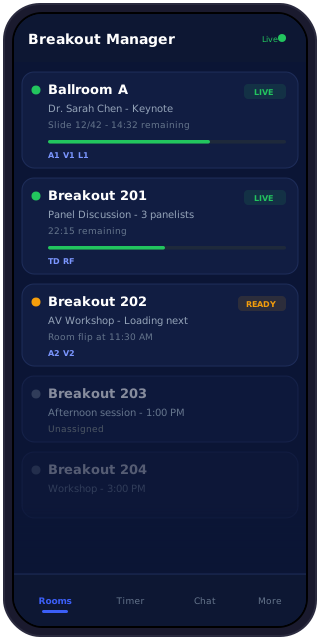
Monitor every room in real time. See live status, current presenter, connected equipment (RF, Powerpoint), and room flip schedules at a glance.

Speaker Timer

Server-synced countdown timers visible to operators, speakers, and desktop clients. Configurable segments, warnings, and overtime tracking.

Crew Portal

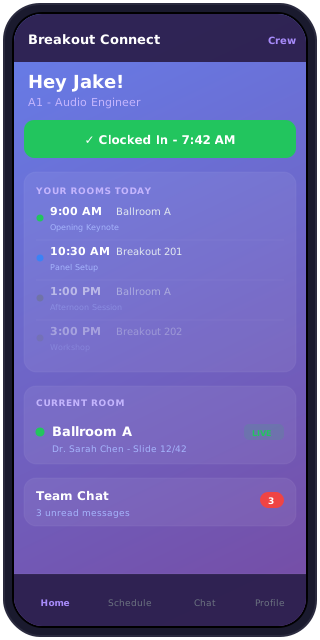
Self-service hub for crew. View schedules, clock in/out, see room assignments, and get real-time updates on presenter status.

File Review

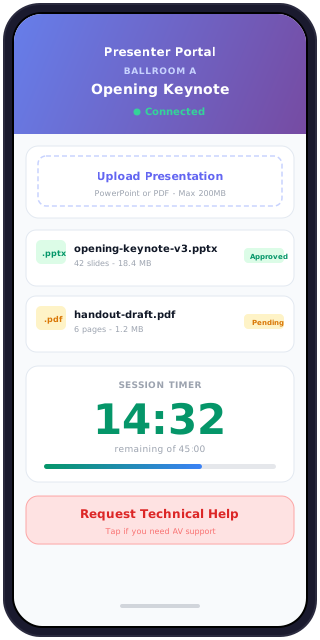
Presenters upload directly to their session. Review PowerPoint and PDF files in-browser, then approve or reject with notes.

SOS Management

Speakers scan a QR code to request help. Your team gets instant SMS alerts. One tap to acknowledge, one tap to resolve.

Desktop Client

Native app for operators. Tracks slide positions, shows timer overlays, sends heartbeats, and works alongside your switcher.

See why AV teams are switching to Breakout Connect

Use Tabs Below To See How Organized Your Event Can Be

Your Event At A Glance

acme-conference.breakoutconnect.live
Why Breakout Connect

Built different from generic tools

This isn't a project management app with an event skin. It's built from the ground up for live production.

Real-time, not refresh
WebSocket-powered updates mean every room change, timer tick, and help request appears instantly across all devices. No polling, no page reloads.
🌐
Zero installs for your team
Crew, presenters, and operators all access through a browser. No app store downloads, no IT approval cycles, no version mismatches.
🔒
Your brand, your domain
Every client gets their own subdomain. Upload your logo, set your colors. Enterprise plans support fully custom domains.
🕒
Server-synced timers
The speaker and the operator always see the same time. No drift, no confusion. Timers survive page refreshes and device switches.
📱
Purpose-built portals
Presenters, crew, and operators each get their own interface designed for their role - not a dumbed-down version of the admin dashboard.
📋
Complete audit trail
Every timer start, file approval, help request, and crew clock-in is timestamped and searchable. Review any moment from any event.

Built For Mobile First

Presenter Portal

Speakers upload and check in themselves

Each presenter gets a unique link to upload files, see their timer, and request technical help. No app downloads, no account creation.

Crew Portal

Your crew manages themselves

Crew members clock in, view room assignments, check schedules, and message the team - all from their phone. You see who's where in real time.

Your Event At A Glance

Real Time Status Updates From Every Room At Your event

The mobile dashboard gives operators room status, timers, and team chat on the go. PWA install means it works even with spotty venue wifi.
See It In Action.

No Commitment Required.

Get a fully functional demo environment with sample data preloaded. Explore every feature, invite your team, and experience what coordinated event production feels like.

Full-featured demo portal with sample event data

Your own branded subdomain in seconds

Invite unlimited team members to explore

No credit card required — zero risk

Convert to paid plan anytime — keep all your data

Scroll to Top