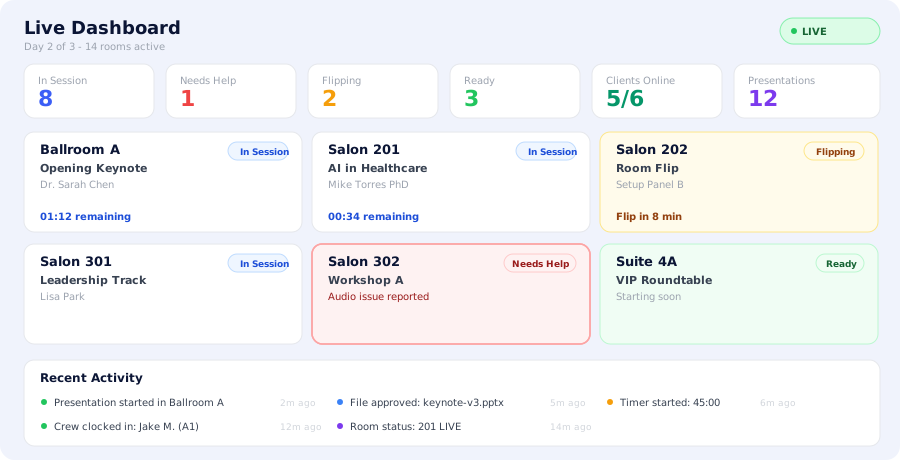
Your live dashboard shows the real-time status of every room at your event. Color-coded cards update instantly via WebSockets - you see a room flip, a help request, or a presentation start the moment it happens.
Color-coded room status: In Session, Flipping, Ready, Needs Help
Live stats bar: rooms active, crew online, presentations running
Slide tracking from connected desktop clients
WebSocket-powered -- updates appear in under 1 second
Click any room for full session details and assigned crew
Precision Timing
Server-synced timers.
Operator and speaker always match.
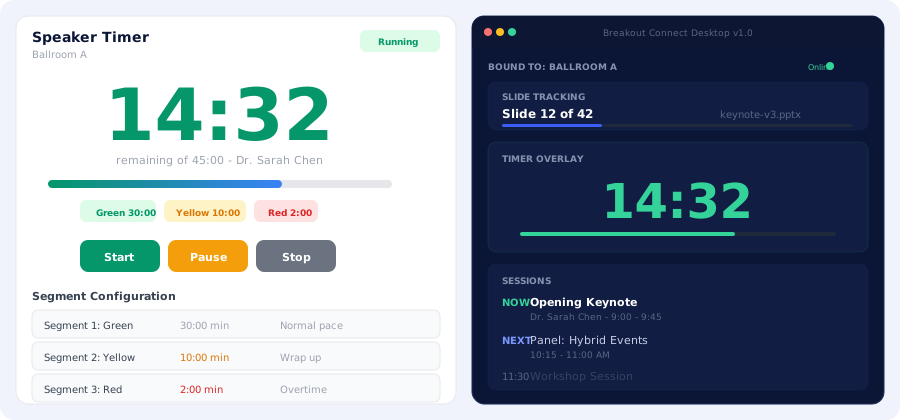
The timer runs on the server -- not in anyone's browser tab. The countdown on the operator's dashboard, the presenter's portal, and the desktop client overlay all show the exact same number. No drift. No confusion.
Configurable color segments: Green, Yellow, Red with custom durations
Start, pause, stop, and adjust without resetting
Desktop client shows timer overlay on top of PowerPoint/Keynote
Slide tracking: see which slide the presenter is on, live
Timers survive page refreshes and device switches
Server-synced -- operator and speaker always see the same countdown
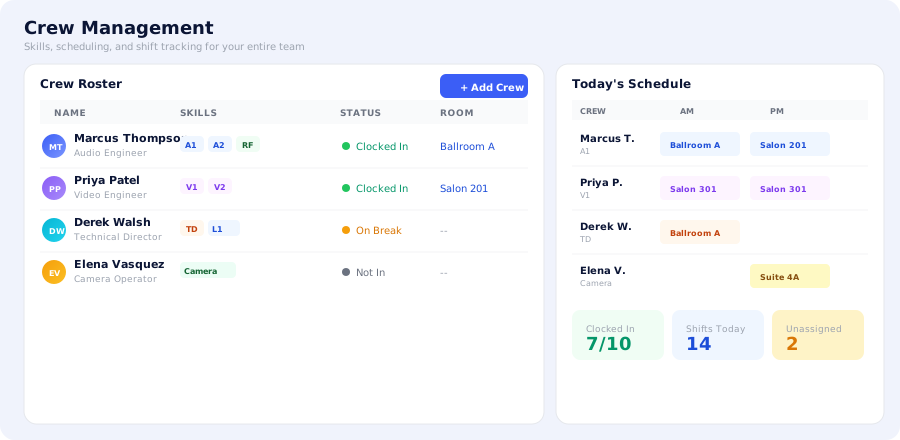
Your crew roster tracks every technician's skills, certifications, and current status. The scheduling grid assigns shifts by room and time block. The crew portal gives each tech a mobile-friendly view of their assignments.
Full crew database with skill tags (A1, A2, V1, V2, TD, RF, Camera)
Self-service crew signup page -- share a link, they join your roster
Mobile crew portal: clock in/out, view schedule, see room status
One-click SMS invite links -- no accounts needed
Export timesheets at event close for payroll
Communication Hub
Built-in chat, DMs, and
one-way broadcasts.
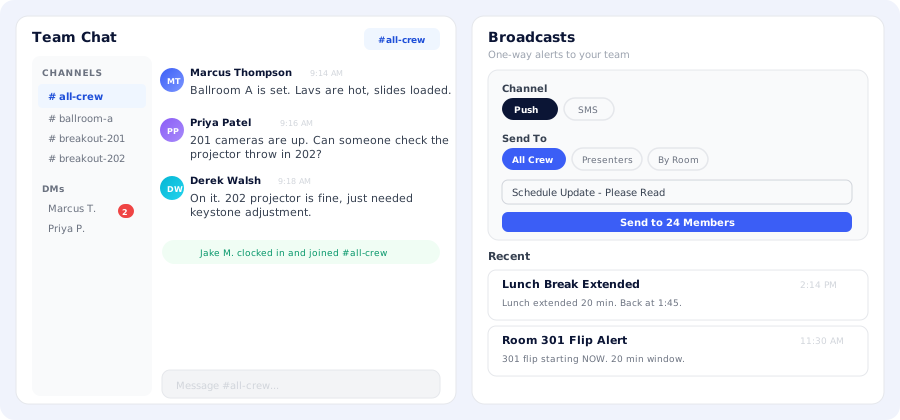
Team Chat gives your crew a built-in messaging system with room-specific channels, direct messages, and Web Push notifications. Broadcasts let you send one-way alerts via push or SMS with delivery confirmation.
Room-based channels auto-created per room
Direct messages between any team members
Web Push notifications -- works even when the tab is closed
Broadcast alerts: push or SMS, targeted by room or role
Delivery tracking: see who received each broadcast
No external tools needed -- everything stays inside the platform
File Management
Presenters upload.
You review.
Files never touch your inbox.
Each presenter gets a secure portal link to upload slides and materials. Uploads land in your review queue - preview PowerPoint and PDF files directly in the browser, then approve or reject with one click.
Presenter self-upload portal -- drag-and-drop, no login required
In-browser preview for PowerPoint and PDF files
Approve/reject workflow with reviewer notes
Review status visible to the presenter in real time
Optional: disable review for automatic file publishing
S3-backed storage with authenticated stream proxy
RF Management
Wireless coordination,
finally under control.
Each presenter gets a secure portal link to upload slides and materials. Uploads land in your review queue - preview PowerPoint and PDF files directly in the browser, then approve or reject with one click.
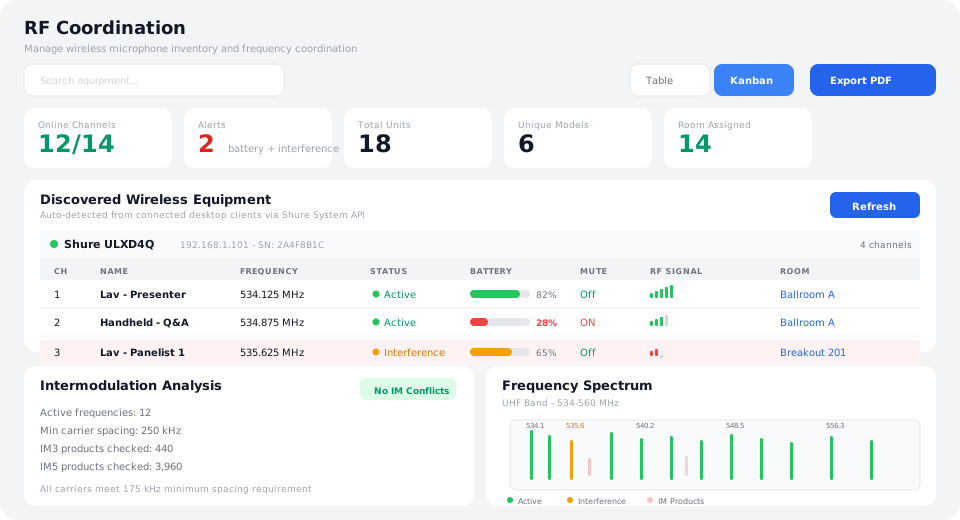
Auto-detect Supported Shure SLXD/AXIENT/ULXD/QLXD devices via desktop clients on the local network
Live battery, mute, RF signal, and interference monitoring per channel
IM3/IM5 intermodulation conflict detection with backup frequency suggestions
Room-by-room equipment assignment with kanban and table views
Platform-wide equipment library -- push your catalog to all client events
Export RF coordination sheets to PDF
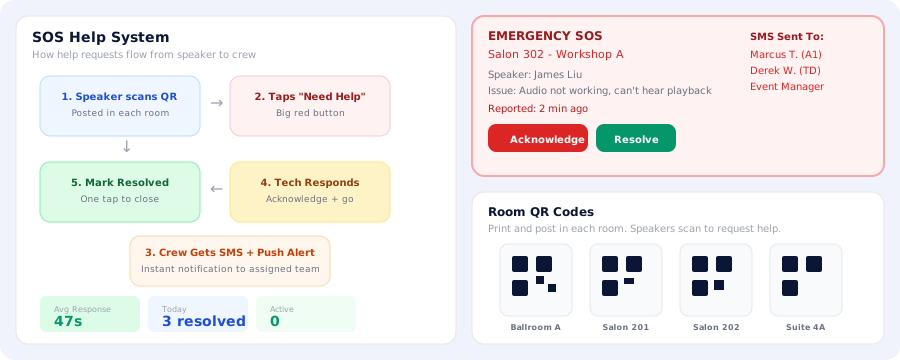
1. Speaker scans QR
→
2. Taps "Need Help"
→
3. Crew gets SMS alert
→
4. Tech responds
→
5. Resolved
Instant Support
Speaker needs help?
Your team knows in seconds.
Print a QR code for each room. When a speaker scans it and taps "Need Help," your crew gets instant SMS and push notifications. The request appears on the dashboard with room name, speaker details, and the issue.
QR code per room -- speakers scan with their phone camera to request help
One-tap SOS button on the presenter portal
Instant SMS + push notification to assigned crew members
Help request visible on the live dashboard with urgency indicator
Acknowledge and resolve with timestamps -- full accountability
Complete SOS history searchable in the activity log
Changeover Management
Track every flip.
Assign every piece of gear.
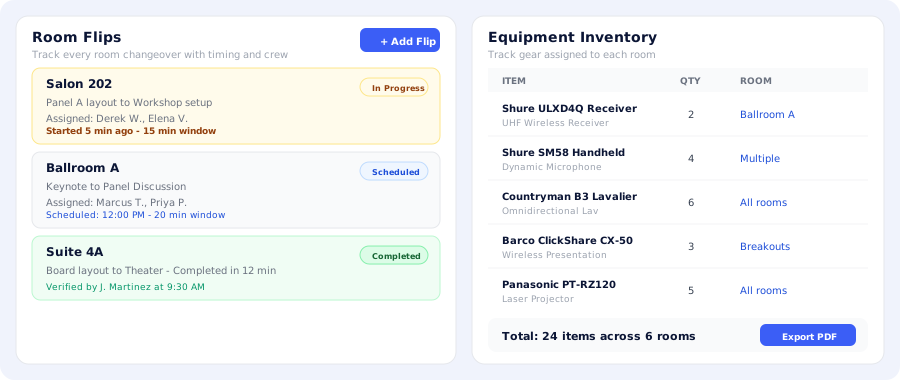
Schedule room changeovers with assigned crew, timing windows, and layout descriptions. Track progress in real time. The equipment inventory tracks every piece of gear across your event by room assignment.
Schedule flips with crew assignments and time windows
Real-time flip progress: Scheduled, In Progress, Completed
Verification sign-off when a flip is done
Equipment library with manufacturer, model, quantity, and room assignment
Platform-wide equipment catalog pushed to all client events
Export equipment list and flip schedule to PDF
See It In Action.
No Commitment Required.
Get a fully functional demo environment with sample data preloaded. Explore every feature, invite your team, and experience what coordinated event production feels like.